Solar Designer Review (2026): 3D Rooftop Design, DISCOM Drawings and BOM for Indian EPCs
An independent review of Solar Designer (solardesigner.in), the browser-based 3D rooftop solar designer that produces a full drawing pack, SLD and bill of materials — strengths, limitations, and who should choose an alternative.
Solar Designer is a browser-based 3D rooftop solar design tool for Indian EPCs. Its standout is engineering output: from one 3D design it produces a string route plan, PV array drawing, single-line diagram, earthing and lightning arrester layout, structure drawing, cable routing layout, site plan and a bill of materials priced at your own rates. In our comparison of the best 3D solar design software for Indian EPCs it scored 4.65 out of 5, second overall.
Verdict
Solar Designer is an excellent choice for engineering-led EPCs who want a complete, consistent drawing pack and an accurate BOM straight from the 3D design. Its guided project setup, elevated-structure modelling, sun-path simulation and editable SLD ratings that flow through to the BOM are genuinely useful. Its weaknesses are mostly about transparency: pricing isn't published, there's little public documentation beyond the app itself, and language support isn't stated. It also appears to run on the same platform as SolarDraft, so compare plans and support before choosing between them. Score: 4.65 / 5.
How we reviewed it
PV Repair has no commercial relationship with Solar Designer or any other software vendor, and we weren't paid for this review. It's based on the publicly accessible Solar Designer application and its interface as of November 2026. Features we couldn't verify publicly were scored conservatively. See our editorial policy.
Same platform as SolarDraft
Solar Designer's application has the same interface and version numbering as SolarDraft, which sells a fully white-label plan that runs on a customer's own domain. In practice, Solar Designer appears to be built on the same underlying platform. It's offered under its own name, domain, support and pricing, so we review it on its own terms — but if you're choosing between the two, expect very similar design tools and compare plan terms, price and support. Our SolarDraft review covers the other side.
What Solar Designer does
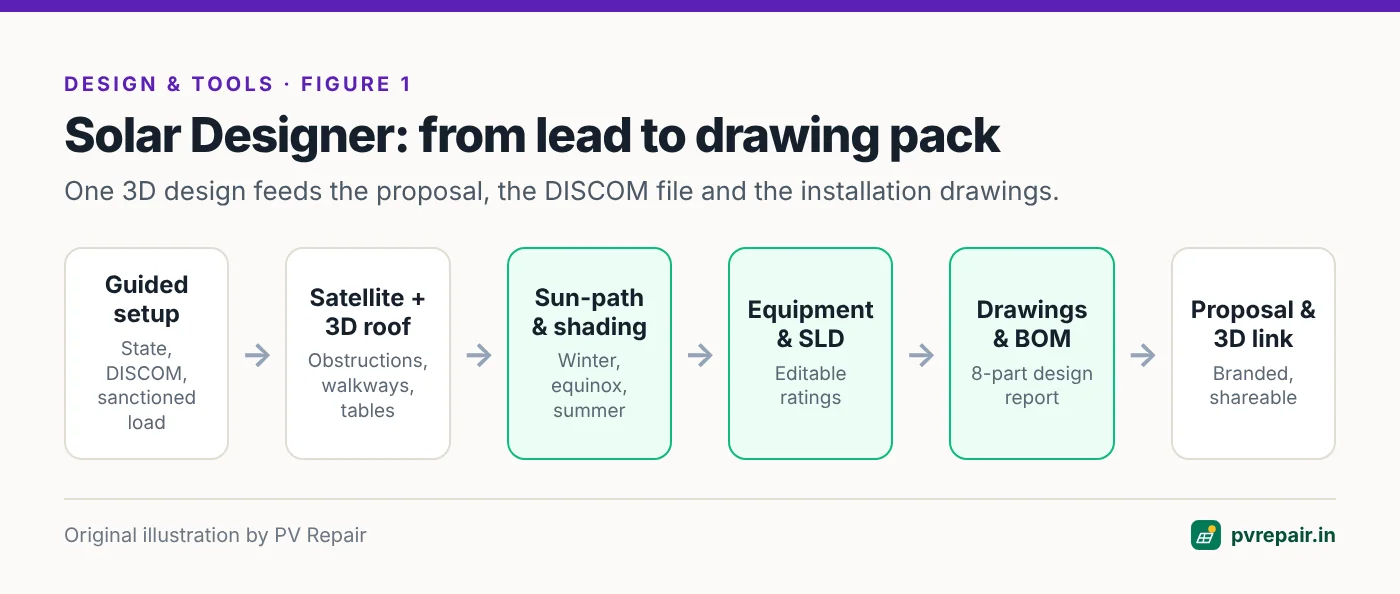
Solar Designer opens straight into the application: a dashboard for 3D designs, proposals, CRM, site surveys and projects, with shortcuts to start a new 3D design, proposal or lead. Its tagline — build 3D in the first meeting — describes the intended use: model the customer's roof while you're with them, then turn the same design into a proposal and an engineering drawing set.
Guided project setup
A new design starts with a six-step guided setup. The first step captures the customer and project name, state and DISCOM, residential or commercial site type, single- or three-phase connection, sanctioned load and, optionally, the design wind speed. You then locate the site by address or latitude and longitude, confirm it on high-definition satellite imagery, and see the site's solar resource in kWh/m²/day.
Capturing sanctioned load and connection type at the start matters in India: DISCOMs typically link permitted solar capacity to sanctioned load, so a design that ignores it can be rejected.
Equipment libraries
Panels and inverters are chosen from built-in libraries with filters. If your module isn't listed, you can add a custom panel by brand, model, wattage and dimensions, or send the brand and model to the Solar Designer team to have it added. Wiring and cables, electrical components and structures are selected the same way.
3D roof and structure modelling
You can draw roofs and buildings, set roof type and height, edit walls, and add obstructions and walkways. Panels can be placed individually, in a line, or with "fill roof". For the raised structures common on Indian terraces, table settings cover tilt, leg height, azimuth and the number of rows and columns, with separate row, column and support settings. Lightning protection can be added to the layout.
Sun-path and shading
A sun-path view steps through winter, equinox and summer paths — or today's date — with a time slider from sunrise to sunset, alongside 2D and 3D views. Per-panel shading and an energy report show where generation is lost. This is the feature that prevents the classic Indian rooftop mistake of placing modules where a water tank or staircase room shades them in winter; see our hotspots guide for why that matters.
The drawing pack
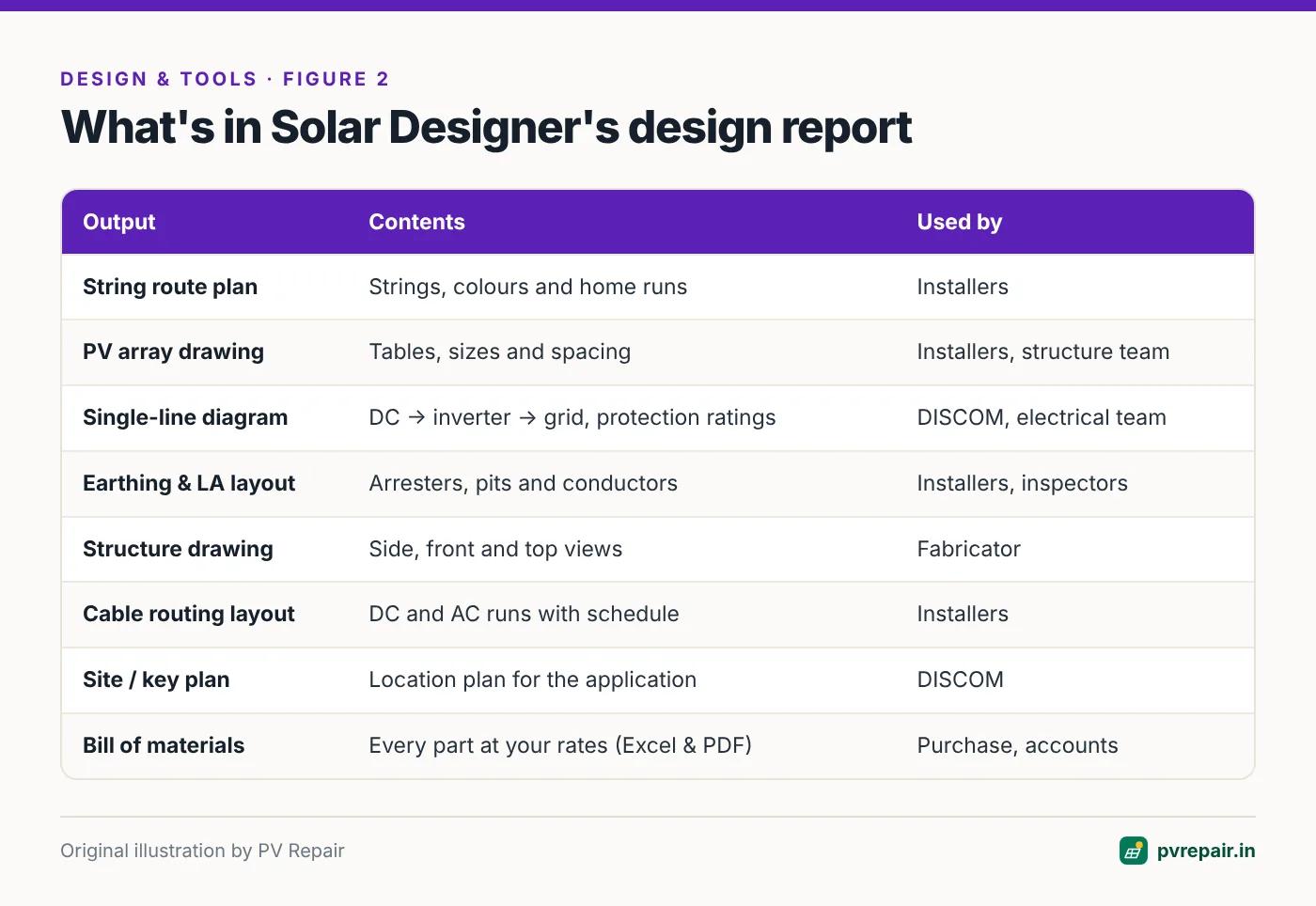
The design report bundles eight outputs, each downloadable individually or as one PDF. This is Solar Designer's strongest feature. Each drawing serves a different audience: installers get string routes, array spacing and cable schedules; the DISCOM gets the SLD and site plan; the fabricator gets structure views; and purchasing gets the BOM.
Editable SLD ratings that update the BOM
SLD ratings — cables, fuses, isolators, breakers, SPDs, grid connection and earthing — are calculated from your strings. You can change any of them, and both the SLD and the bill of materials update to match. That keeps drawings and purchasing consistent, a common source of site errors when they're prepared separately.
Proposals, sharing and CRM
A saved company profile — logo, default cover photo, an about gallery, company name, contact details, address, GSTIN and tagline — fills into every proposal. You can share a live 3D view with the customer by link, set an accent colour for the design report, and merge the proposal and design report PDFs in the browser without uploading them to a server. Leads, site surveys, designs, quotes and projects live in the same workspace, and call and WhatsApp support is available for design questions.
Pros and cons
What we like
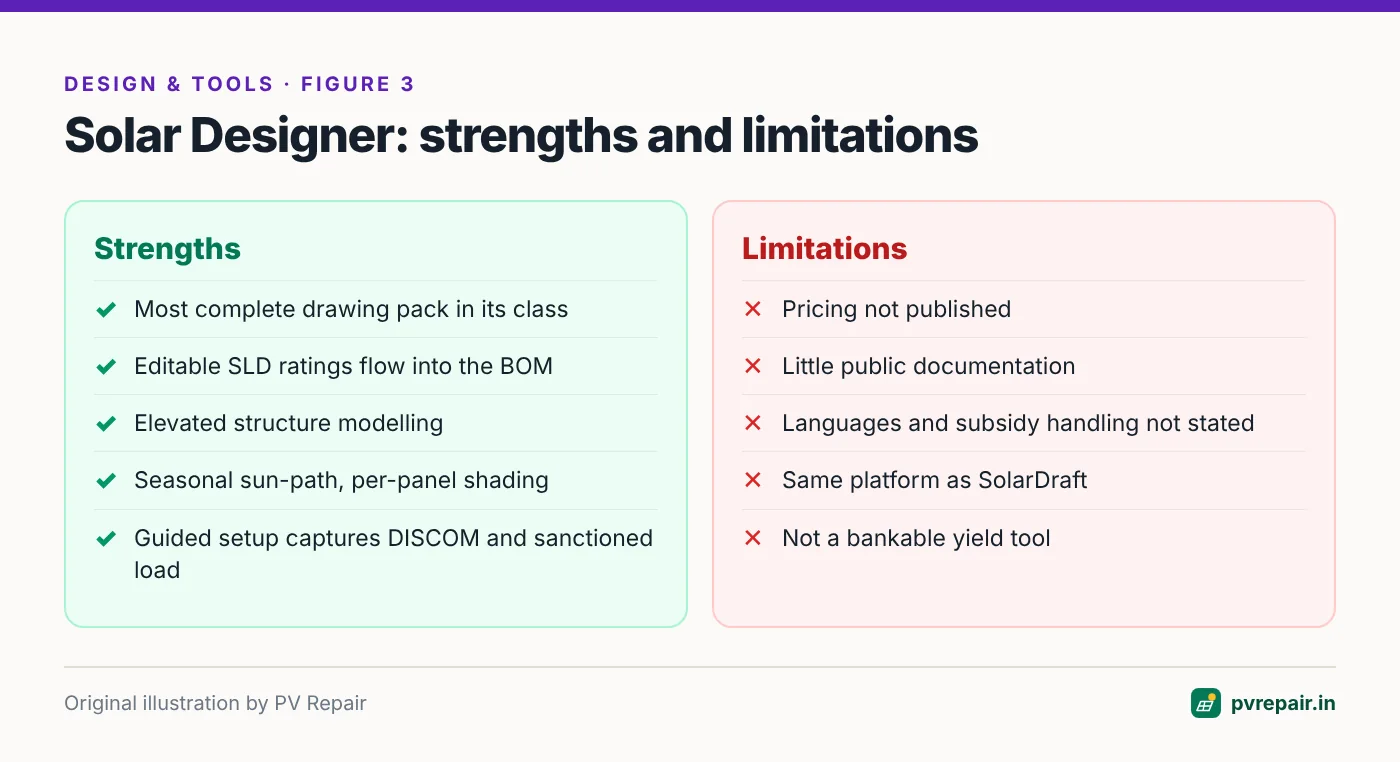
- The most complete engineering drawing pack we've seen in a browser-based Indian design tool.
- Editable SLD ratings that flow into the BOM, keeping drawings and purchasing consistent.
- Elevated-structure modelling with tilt, leg height, azimuth and table layout.
- Seasonal sun-path simulation with per-panel shading.
- Guided setup that captures DISCOM, sanctioned load and connection type up front.
- Privacy-friendly PDF merge in the browser.
What could be better
- No published pricing. You'll need to contact the team for plans and a demo.
- Little public documentation. The domain opens straight into the app; there's no public features list, help centre or pricing page to evaluate before signing up.
- Language support isn't stated, and PM Surya Ghar subsidy handling isn't documented on the public site.
- Few independent reviews are available yet.
- Same platform as SolarDraft, so the two compete mainly on plans, price and support rather than features.
- Not a bankable yield tool — use PVsyst for lender-grade reports on large projects.
How it scored
| Criterion (weight) | Score / 5 | Why |
|---|---|---|
| India readiness (20%) | 4 | State, DISCOM, sanctioned load and wind speed captured; subsidy handling and languages not documented |
| Speed to 3D design (15%) | 5 | Satellite to 3D design in one sitting with guided setup |
| Shading accuracy (15%) | 4.5 | Seasonal sun-path simulation, per-panel shading, energy report |
| Engineering drawings (15%) | 5 | Eight-part drawing pack with SLD, earthing & LA, structure, cable routing, site plan |
| Proposals (10%) | 4.5 | Branded proposals, shareable 3D view, PDF merge |
| BOM & costing (10%) | 5 | Full BOM at your rates, linked to editable SLD ratings |
| Access (10%) | 5 | Browser-based, works on mobile |
| Support & price fit (5%) | 4.5 | Call and WhatsApp support; pricing on request |
| Weighted score | 4.65 |
Who should use Solar Designer
- Engineering-led EPCs who want standardised drawings and BOMs on every project.
- EPCs doing a mix of residential and C&I rooftops, especially with elevated structures.
- Teams who have had DISCOM rejections or site errors caused by inconsistent drawings.
- Buyers who prefer a direct, conversational sales and support relationship (call and WhatsApp).
Who should consider something else
- Residential sales teams who want published prices, six languages and subsidy-aware proposals out of the box — SolarDraft documents all three.
- Buyers who want an established vendor with a large user base — consider Arka360.
- Phone-first sales teams — Reslink is designed mobile-first.
- Utility-scale developers — PVcase; bankable yield reports — PVsyst.
Questions to ask before you buy
- What does each plan cost, including GST, and how many designs per year does it include?
- Which languages does the interface and proposal support?
- Does the proposal calculate PM Surya Ghar subsidy automatically?
- Can we remove or change branding on drawings and proposals?
- How are our design files and customer data stored and exported if we leave?
- What support hours and response times can we expect during peak season?
- Can we submit a trial drawing set to our DISCOM before committing?
Frequently Asked Questions
What is Solar Designer?
Solar Designer (solardesigner.in) is a browser-based 3D rooftop solar design tool for Indian EPCs. It models the roof and shading in 3D and generates a drawing pack — string route plan, PV array drawing, SLD, earthing and LA layout, structure drawing, cable routing, site plan — plus a bill of materials and branded proposals.
How much does Solar Designer cost?
Pricing isn't published on the website. Contact the Solar Designer team for current plans.
Is Solar Designer the same as SolarDraft?
It appears to run on the same underlying platform: the applications share an interface and version numbering, and SolarDraft sells a white-label plan. Solar Designer is offered under its own name, domain, support and pricing.
Can Solar Designer create DISCOM drawings?
Yes. Its design report includes a single-line diagram and a site/key plan intended for DISCOM applications, along with installation drawings. Check the formats with your DISCOM.
Does Solar Designer support elevated structures?
Yes. Table settings include tilt, leg height, azimuth, rows and columns, with separate support settings.
What are the best Solar Designer alternatives?
SolarDraft, Arka360 and Reslink scored closest in our comparison. OpenSolar is a free option, and PVsyst remains the standard for bankable yield reports.
Sources
- Solar Designer application, reviewed November 2026 — solardesigner.in
- SolarDraft, "Pricing" page (white-label plan details), reviewed November 2026 — solardraft.org
- PV Repair, "Best 3D Solar Design Software for Solar EPCs in India (2026)" — pvrepair.in
Related guides
SolarDraft Review (2026): Features, Pricing, Pros and Cons for Indian Solar EPCs
An independent review of SolarDraft, the browser-based 3D solar design, proposal and CRM software for Indian EPCs — what it does well, where it falls short, what it costs, and who should choose an alternative.
Solar String Sizing Calculator for India: Cold Voc, Hot Vmp and Modules per String
Free solar string sizing calculator for Indian conditions. Enter module and inverter datasheet values to find the safe range of modules per string — checked against cold-morning Voc, hot-afternoon Vmp and inverter current limits — with the method explained.
How to Design a Rooftop Solar System Under PM Surya Ghar: A Step-by-Step Guide for Installers
A practical, step-by-step guide for installers designing residential rooftop solar under PM Surya Ghar — sizing from the electricity bill, roof area, DCR modules, string and cable design, earthing, subsidy-aware proposals and the paperwork that gets approved first time.